
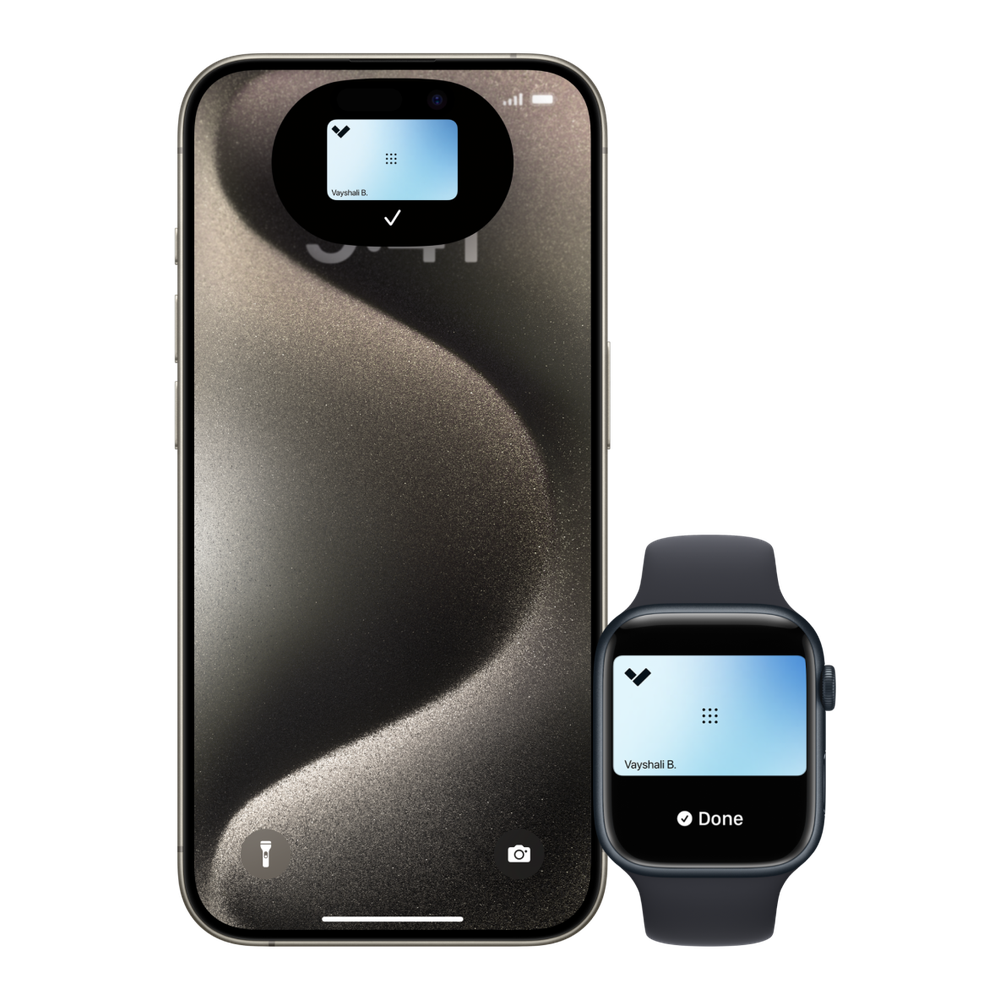
Quick answer: Most Honolulu offices should run both. Encrypted key cards and fobs remain the simplest credential for staff, cleaning crews and anyone without a work phone, while mobile credentials in Apple Wallet or the Verkada Pass app cut lost-card hassle and let you issue access remotely. A modern multi-technology reader accepts both at the same door, so the real decision is not card or phone. It is retiring old 125 kHz prox cards, which carry no encryption, and managing everyone from one cloud dashboard.
If you manage an office in Downtown Honolulu, Kakaako or along Kapiolani Boulevard, you have probably fielded the question: should we keep handing out key cards, or move everyone to their phones? The answer shapes your next key card access control upgrade, so here is how the two compare, from a Honolulu team that has designed access control systems in Honolulu and across the islands since 2019.
What is the difference between a key card and a mobile credential?
A key card or fob is a physical credential with a chip that the reader identifies when you tap it. A mobile credential is the same idea stored on a phone or smartwatch. With Verkada, that means an NFC employee badge in Apple Wallet or on an Android phone, or the Verkada Pass app, which uses Bluetooth and can unlock as you reach for the door. Both are issued, scheduled and revoked from the same Verkada Command dashboard, and Verkada's AD34 and AD64 door readers read cards, fobs, phones and watches at the same door.
Are key cards still secure?
Encrypted ones are. The weak link is the older 125 kHz proximity card, still common in Honolulu buildings from the 2000s and 2010s. Prox cards broadcast an unencrypted number, and security researchers have shown for years that they can be copied with inexpensive, widely available tools. Modern cards and fobs use MIFARE DESFire EV3 chips with AES-128 encryption, which are far harder to clone.
If your office still uses prox, the upgrade does not have to happen all at once. Multi-technology cards carry both a prox and an encrypted credential, so people can keep using old readers while new ones go up door by door. Our access credentials lineup covers each option.
Are mobile credentials more secure than key cards?
Usually, yes, and for a simple reason: people guard their phones. A lost key card often goes unreported for days, while a lost phone gets noticed in minutes and can be locked with Find My. Verkada's Apple Wallet badges also let an administrator turn off Express Mode on chosen readers, so the user has to unlock the phone with Face ID or a passcode first. That gives you two-factor entry on a server room or records room without a separate keypad.
Phones are not perfect. Batteries die, though Apple's Power Reserve keeps a Wallet badge usable for up to five hours after an iPhone runs low, according to Verkada. And not every employee wants a work app on a personal phone, which is a policy question worth settling before rollout.
Which credential works better for a Honolulu office?
It depends on who is coming through the door.
- Full-time staff with smartphones: mobile. New hires get access the day they start, even before their first visit, and nobody needs a replacement card.
- Cleaning crews, temps and staff without a work phone: cards or fobs. They are simple, cheap to replace and do not depend on a personal device.
- Managers and IT: mobile, plus remote unlock, so they can let in a vendor from anywhere.
- Visitors and contractors: time-limited access, often paired with visitor management at the front desk.
- Neighbor-island branches: mobile shines here, because you can issue access to a Maui or Hilo office from Honolulu without shipping a card.
How do multi-tenant buildings in Honolulu handle this?
In many Downtown and Kakaako towers, the building and the tenant run separate systems. Property management controls the lobby turnstiles, elevators and garage, and each tenant controls its own suite doors. If that is your situation, ask building management what credential technology the lobby readers use before you choose yours, because carrying one card for the building and a phone for the suite is common and perfectly workable. If you own or manage the building, a cloud system lets you run lobby, elevator floors and garage on one platform, with tenants managing their own suites. Our commercial real estate page covers how portfolio owners set this up.
What does switching cost and involve?
Less than most owners expect, because readers and controllers can often reuse existing door hardware and wiring. The process is a site walk to count doors and check the current hardware, a written design and proposal, provisioning of every reader and credential before go-live, and a cutover that often happens one floor at a time. Physical mounting and wiring are performed by licensed Hawaii low-voltage contractor partners. For numbers, see our guide to what door access control costs in Hawaii.
Whether you stay with cards, move to phones or run both, the readers, schedules and audit trail live in one dashboard, paired with your cameras. See how USP designs door access control in Hawaii, or read about everything we do for Honolulu security systems.
Frequently Asked Questions
Can one reader accept both key cards and phones? Yes. Verkada's AD34 and AD64 readers accept encrypted cards, fobs, prox cards, Apple Wallet and Android NFC badges, and Bluetooth unlock through the Verkada Pass app, so you can mix credentials at every door.
Are 125 kHz prox cards safe to keep using? They work, but they carry no encryption and can be copied with inexpensive tools. Most offices replace them with encrypted DESFire EV3 cards or mobile credentials, using multi-technology cards to phase the change in.
What happens if an employee's phone dies? An iPhone with an Apple Wallet badge can still unlock doors for up to five hours in Power Reserve, according to Verkada. For anyone who regularly runs out of battery, a backup card or fob is an easy fallback.
Do employees need an app on their phone? They use the Verkada Pass app to add their badge to Apple Wallet, and after that the badge works from Wallet without opening the app. Bluetooth unlock and remote unlock run through Verkada Pass itself.
How fast can I revoke access? Seconds. Whether it is a card, fob or phone, an administrator revokes it from the Command dashboard on a computer or phone, and the change applies to every door the person could open.